TotalTerminal
a system-wide terminal available on a hot-key
Check out also TotalFinder
About
TotalTerminal is a plugin for Terminal.app.
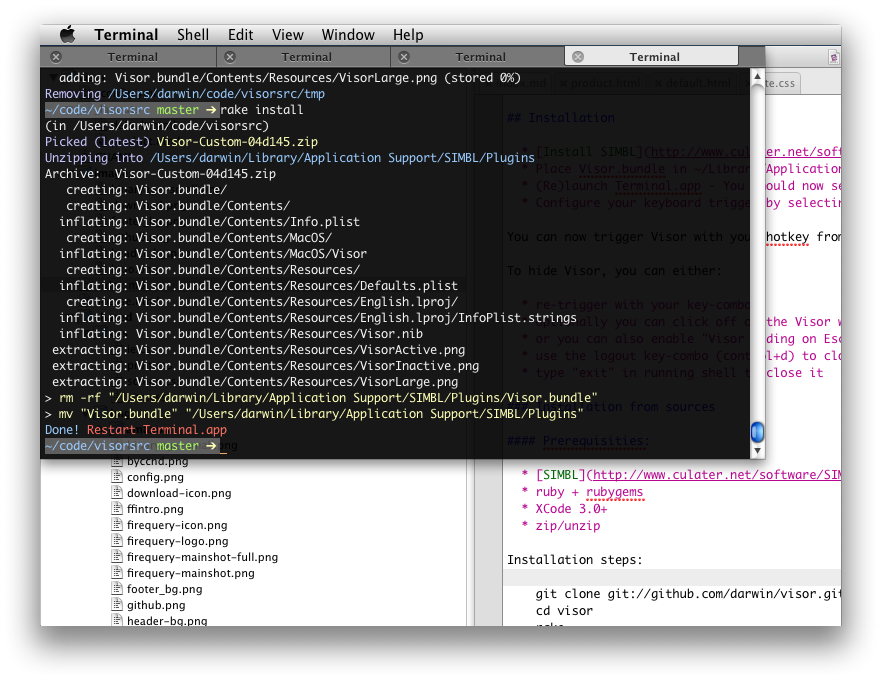
It provides persistent Visor Window which slides down when you press a hot-key (remember Quake console?).
Installation
TotalTerminal has an installer
- Download latest TotalTerminal.dmg and run the installer.
- Configure your keyboard trigger by selecting the
Preferences... -> TotalTerminaland edit your keyboard hot-key. By default it isCTRL+~.
Then you can trigger Visor Window with your hot-key from any application to get an instant terminal session.
To hide Visor window, you can either:
- re-trigger with your key-combo
- optionally, you can click off the TotalTerminal window
- optionally, you can hit ESC (if enabled in TotalTerminal preferences)
Compatibility






FAQ
Does it run under OS X 10.11 (El Capitan)?
Not under default configuration. It requires a system tweak, read about it here.
How do I uninstall TotalTerminal?
You may use Status Menu Icon and select
Uninstall TotalTerminal. Alternatively you may download TotalTerminal DMG again and useTotalTerminal Uninstallerwhich is present there.Alternatively you can launch this command in Terminal.app:
open "/Library/ScriptingAdditions/TotalTerminal.osax/Contents/Resources/TotalTerminal.bundle/Contents/Resources/TotalTerminal Uninstaller.app"
What is the difference between Visor.bundle and TotalTerminal.app?
TotalTerminal supersedes Visor. Visor.bundle is a SIMBL plugin which was originally written by Nicholas Jitkoff from Blacktree. Original Visor was introduced for OS X - Tiger. I have been developing it since Leopard. I decided to rename it to TotalTerminal with OS X Lion release. TotalTerminal has installer, Sparkle updater and does not depend on SIMBL. In the future it will get more bug fixes and hopefully some new features.
The main technical difference is that TotalTerminal is not launched automatically. You have to launch TotalTerminal.app to inject plugin into Terminal.app (if it is not running the launcher will launch it)
I see two Terminal.app icons in the Dock. How should I get rid of it?
This affects people who pin TotalTerminal.app icon in the Dock as a permanent icon.
When you click TotalTerminal.app icon in the Dock, the system launches TotalTerminal.app. But TotalTerminal.app is just a lightweight launcher which:
- launches Terminal.app (if it is not running)
- injects TotalTerminal plugin into it.
- quits
You end up with two Terminal icons in the Dock: one for running Terminal.app and second for pinned TotalTerminal.app (which is not running anymore after injecting the plugin).
How to remove Terminal from App Switcher (CMD+TAB)?
Please follow this thread to set special flag from command line. Under Mavericks you cannot easily modify Terminal.app’s Info.plist - this would break code signature from Apple.
Where are TotalTerminal settings stored?
TotalTerminal settings are stored with Terminal.app settings. You can
open ~/Library/Preferences/com.apple.Terminal.plistand tweak the values (better to do this when Terminal.app is not running). If you have troubles with TotalTerminal settings, delete this file and restart Terminal.app. The file will be recreated with default values.
How can I open a new terminal window the old way, as a classic OSX window?
If there is a Visor Window (the status menu icon is active) every new terminal window will be opened as a classic OS X window. In other words, open at least two terminal windows. The second one will be a classic terminal window for sure.
How can I change the height of Visor?
Go to Terminal.app’s Preferences -> Window -> Rows
How can I stick Visor to left screen edge?
Look for the “Position” option in TotalTerminal Preferences and pick “Left-Stretch” window placement.
How can I change the width of Visor?
By default Visor Window stretches to the full screen width. Set some non-stretching positioning for Visor Window in TotalTerminal Preferences, then Go to Terminal.app’s Preferences -> Window -> Columns.
Is it possible to show Visor only on a secondary monitor?
Go to TotalTerminal Preferences -> Screen
Is it possible to see Visor on every Space?
TotalTerminal forces Visor window to be visible on every space. You may disable this in TotalTerminal Preferences. Note: Spaces configuration for Terminal.app doesn’t apply to the Visor Window, it is effective only for other (classic) terminal windows.
I want to keep different preferences for Visor and other (classic) terminal windows. What is the best way manage this?
There may be a profile in Terminal.app called “Visor”. Visor Window attempts to use the “Visor” profile when opening new tabs in Visor Window (regardless of “default profile” or “startup profile” settings in Terminal.app). In case “Visor” profile is not present, it uses currently selected default profile.
Do I need to install TerminalColours SIMBL with TotalTerminal?
No, TerminalColours is integrated into TotalTerminal 1.0 and later. Actually it conflicts with TotalTerminal if installed as SIMBL plugin.
Do I need to install CopyOnSelect SIMBL with TotalTerminal?
No, CopyOnSelect is integrated into TotalTerminal 1.0 and later. It is a configurable option in TotalTerminal Preferences (disabled by default).
SIP
System Integrity Protection
Starting with macOS 10.11 (El Capitan), TotalTerminal cannot run on a normally configured machine due to System Integrity Protection.
System Integrity Protection (SIP) is a new security feature introduced by Apple. That’s good, but unfortunately it prevents TotalTerminal from augmenting Terminal. This article will tell you how to configure your machine, so that you can use TotalTerminal. Before you do this, it is important to get informed about what System Integrity Protection is, and what it means to turn it off. Technical details are well covered in SIP review on Ars Technica. Apple also provided some information here.
 Do you really depend on TotalTerminal workflows so much that you want to possibly lower your system security?
Frankly, I'm going to stop TotalTerminal development because I have personally switched to iTerm 2. It offers similar functionality to Visor and comparable features to build-in Terminal.app.
Do you really depend on TotalTerminal workflows so much that you want to possibly lower your system security?
Frankly, I'm going to stop TotalTerminal development because I have personally switched to iTerm 2. It offers similar functionality to Visor and comparable features to build-in Terminal.app.
Anyways, if you decide to modify the setting under El Capitan, you will be able to install and run TotalTerminal as before. Just to be clear…
How to modify System Integrity Protection
You must boot into the Recovery OS. You do this by restarting your machine, and holding COMMAND + R until the Apple logo appears.
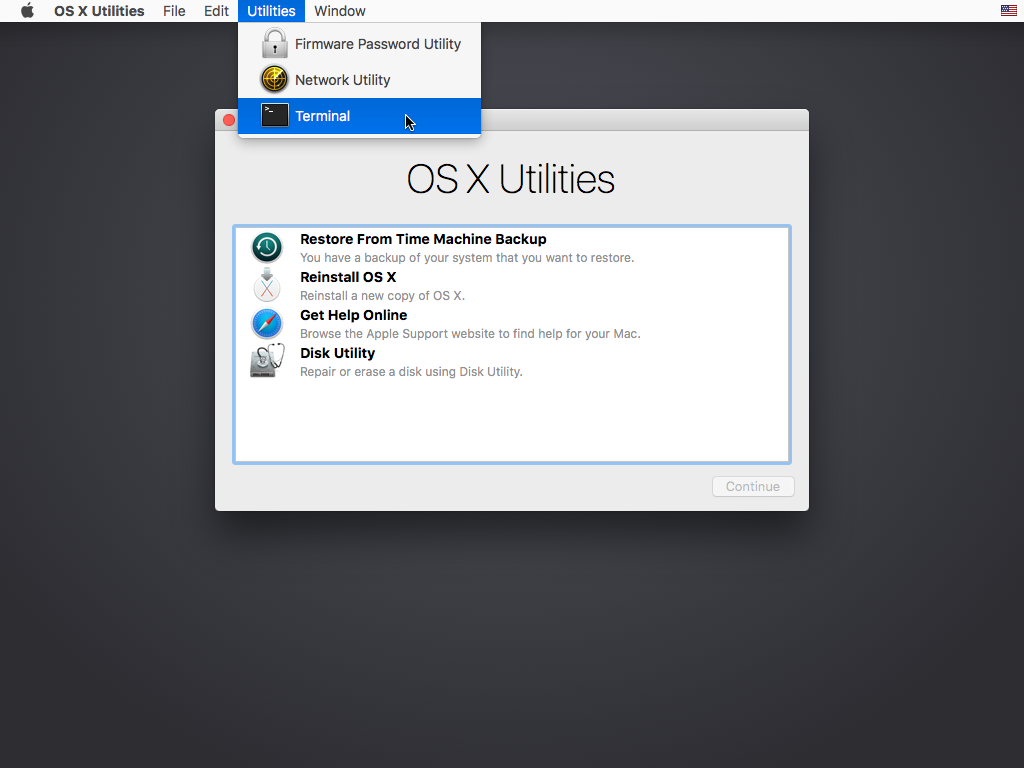
Then select Terminal from the Utilities menu. It looks like this:
In the window that opens, type csrutil enable --without debug and press return.
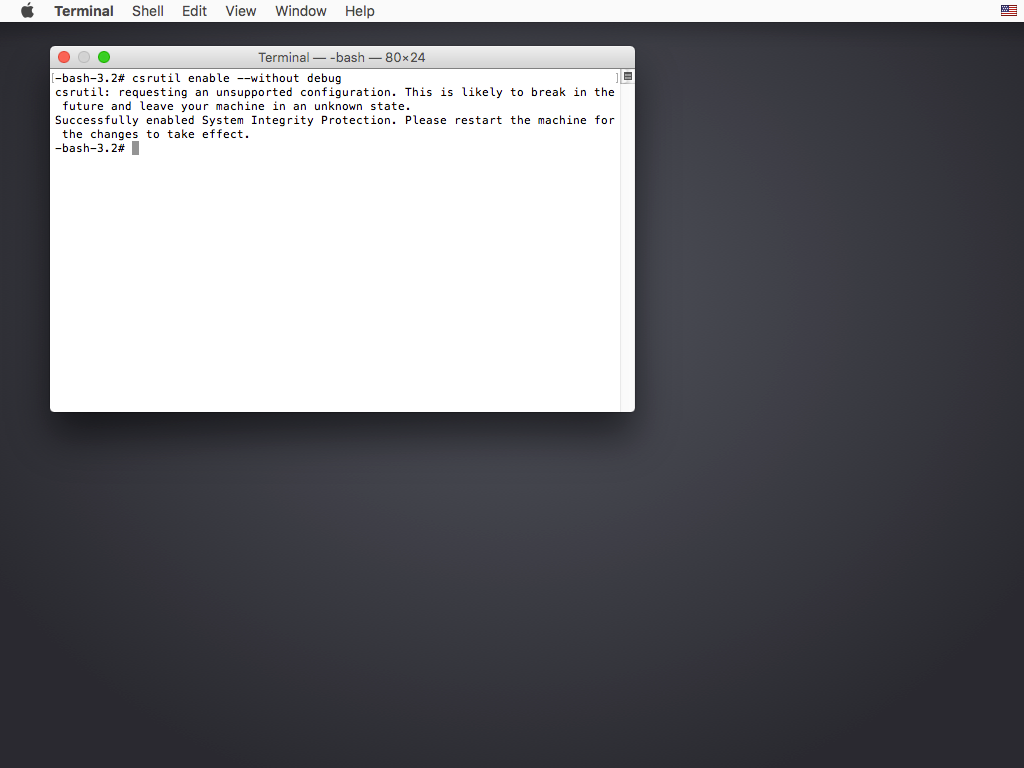
This turns off the part of SIP that TotalTerminal needs to run, and macOS complains that it is an unsupported configuration.
Now type reboot and press return to restart your machine. After restart you may install the latest version of TotalTerminal.
You can find some further information in our blog.
